
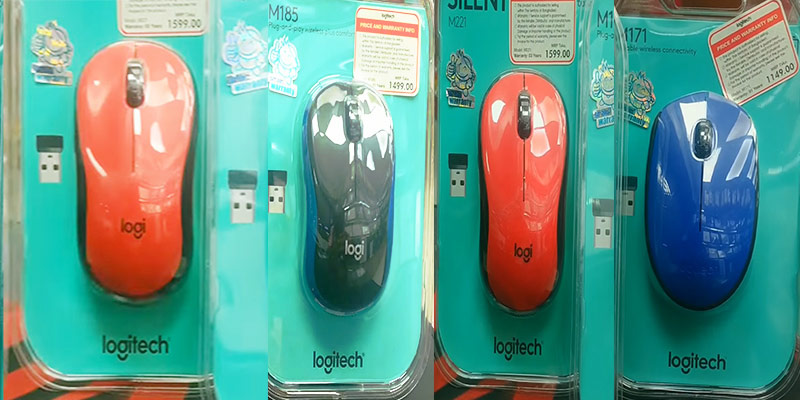
Looking for the Logitech wireless mouse price in Bangladesh? Logitech offers a range of reliable and ergonomic wireless mice that cater to both casual users and professionals.
Known for their smooth performance, long battery life, and precise tracking, these mice are ideal for work, gaming, and everyday tasks.
In Bangladesh, Logitech wireless mice come in different models and price ranges, making it easy to find one that fits your needs and budget.
In this guide, you will explore the latest models and their current prices to help you choose the right mouse.
Logitech Wireless Mouse Price Range In Bangladesh
The price of a Logitech wireless mouse in Bangladesh depends on the model, features, and where you buy it. Here is a general breakdown:
- Budget models: Tk 700 – Tk 1,400
- Mid-range models: Tk 1,500 – Tk 2,800
- Premium/professional models: Tk 3,000 – Tk 7,500+
- Gaming models: Tk 2,500 – Tk 12,000+
These prices can change based on currency rates, stock, and promotions. Always check with more than one seller before buying.
Here’s a quick comparison of some popular Logitech wireless mouse models and their typical prices in Bangladesh:
| Model | Type | Typical Price (Tk) | Best For |
|---|---|---|---|
| Logitech M185 | Basic wireless | 800 – 1,200 | Everyday use |
| Logitech M235 | Compact wireless | 1,100 – 1,400 | Laptop users |
| Logitech M330 Silent Plus | Silent wireless | 2,000 – 2,500 | Quiet work |
| Logitech M590 | Multi-device | 2,800 – 3,300 | Productivity |
| Logitech MX Master 3S | Professional | 7,000 – 8,500 | Office, design |
| Logitech G304 | Gaming | 3,500 – 4,800 | Gamers |
Prices may be higher in local shops compared to online stores. Discounts can be found during special sales.
Popular Logitech Wireless Mouse Models In Bangladesh
Let’s look closer at the most popular models, their features, and who they are best for.
Logitech M185
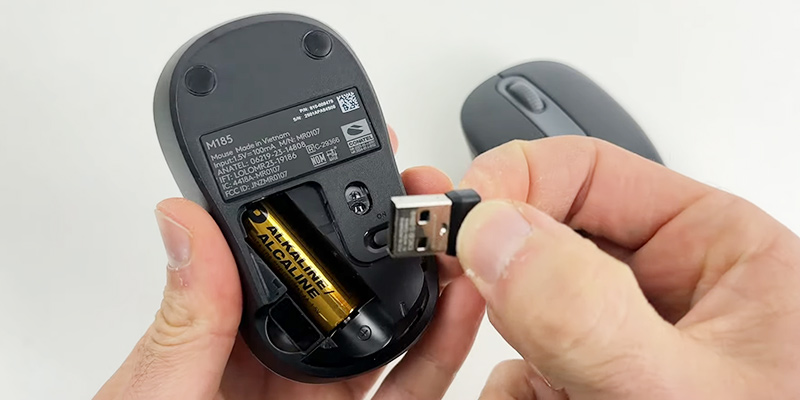
The M185 is one of the most common wireless mice in Bangladesh. It’s compact, reliable, and very affordable, usually under Tk 1,200. It’s perfect for students, office workers, and anyone who needs a simple mouse for everyday tasks. Battery life is about one year. The main limitation is the lack of extra buttons or special features.
Logitech M235
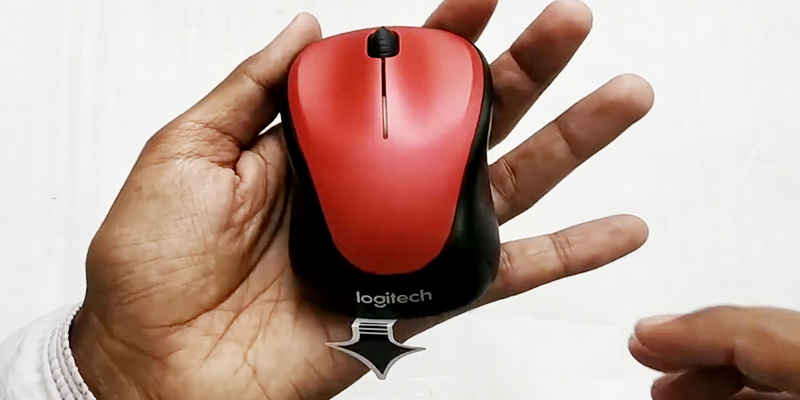
The M235 is similar to the M185 but has a more curved shape and a rubber grip, making it comfortable for long use. It costs a little more (about Tk 1,300), but the extra comfort is worth it if you use the mouse for many hours a day.
Logitech M330 Silent Plus
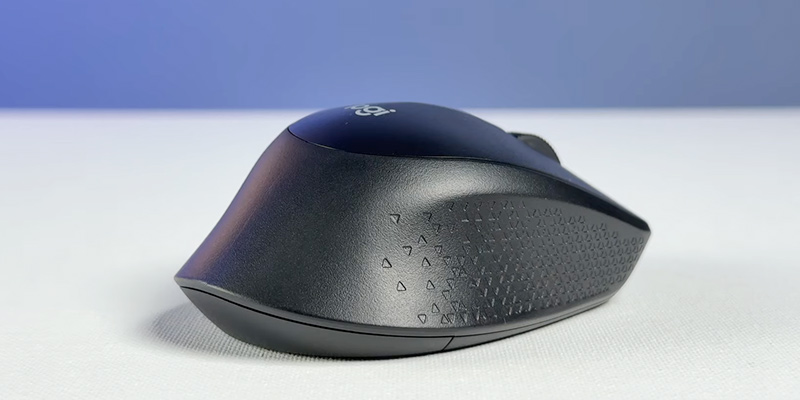
If you work in a quiet office or library, the M330 Silent Plus is a great choice. Its “silent click” feature means you barely hear the mouse. It costs between Tk 2,000-2,500. Many people don’t realize how distracting a noisy mouse can be until they try a silent one.
Logitech M590 Multi-device
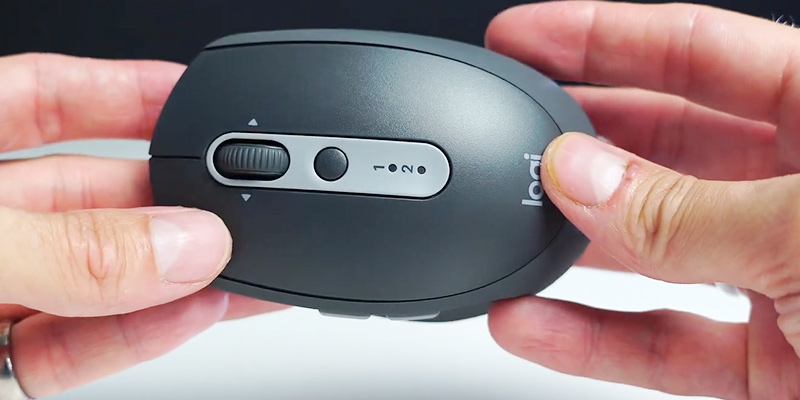
The M590 supports Bluetooth and USB wireless, and you can switch between two computers with one button. This is very useful for people with a laptop and desktop. It also has extra side buttons for easier web browsing. Price is around Tk 3,000.
Logitech Mx Master Series
The MX Master mice are for professionals who use a mouse all day- designers, editors, and managers. The ergonomic shape and advanced scroll wheel make work faster. The price is high (over Tk 7,000), but many users say it’s worth every taka for comfort and productivity.
Logitech G304 Lightspeed
The G304 is a gaming mouse, but many people use it for regular work because it’s fast and lightweight. It has a high DPI sensor and six programmable buttons. Price is about Tk 4,000.
Key Features That Affect Price
Many buyers focus only on price, but features can make a big difference.
Here are the main factors that affect how much a Logitech wireless mouse costs in Bangladesh:
1. Wireless Technology
Logitech uses either 2.4 GHz USB receivers (also called “Nano receivers”) or Bluetooth. Mice with Bluetooth are usually more expensive, but they don’t use a USB port. Some advanced models offer both.
2. Battery Life
Budget models often use one AA or AAA battery and last 6–12 months. Premium models can last up to 2 years on one battery or have rechargeable batteries that last several weeks per charge. Longer battery life usually means a higher price.
3. Extra Buttons And Functions
Basic mice have two buttons and a scroll wheel. Mid-range and premium mice often add back/forward buttons, a side scroll wheel, or special functions like “silent click” (for less noise). Models with more features cost more.
4. Build Quality And Comfort
More expensive mice use better materials and are shaped for comfort. For example, the MX Master series is designed for long hours of use and fits the hand naturally. Cheaper mice are smaller and lighter but may not feel as comfortable.
5. Dpi And Sensor Quality
DPI means “dots per inch” and measures how sensitive the mouse is. Higher DPI is good for gaming or design work. Gaming mice like the G304 or G502 have adjustable DPI up to 12,000 or more. Basic mice are usually 1,000-1,600 DPI.
Here’s a simple feature comparison:
| Model | Wireless Tech | Battery Life | DPI Range | Extra Buttons |
|---|---|---|---|---|
| M185 | 2.4 GHz USB | 12 months | 1000 | No |
| M330 Silent | 2.4 GHz USB | 24 months | 1000 | No |
| M590 | Bluetooth/USB | 24 months | 1000–1600 | Yes |
| MX Master 3S | Bluetooth/USB | Rechargeable | 200–8000 | Yes |
| G304 | 2.4 GHz USB | 9 months | 200–12000 | Yes |
Why Choose A Logitech Wireless Mouse?
When it comes to selecting a peripheral that balances performance, ergonomics, and longevity, Logitech has long been the gold standard. Whether you are a professional navigating complex spreadsheets, a creative editor, or a casual browser, choosing a Logitech wireless mouse is an investment in your daily productivity.
Here is why Logitech continues to lead the market in wireless pointing devices:
1. Industry-Leading Wireless Stability
Logitech’s proprietary Logi Bolt and LIGHTSPEED technologies have virtually eliminated the “lag” that used to plague wireless devices.
- Zero Latency: Their gaming and high-end productivity lines offer a connection so fast that it rivals, and often beats- traditional wired connections.
- Dual Connectivity: Most models allow you to switch between a dedicated USB receiver and Bluetooth, giving you the flexibility to use the mouse across multiple devices like tablets, laptops, and desktops.
2. Advanced Ergonomic Engineering
Logitech doesn’t believe in “one size fits all.” They invest heavily in anatomical research to reduce muscle strain.
- The MX Series: Designed specifically for the human hand, models like the MX Master 3S feature contoured shapes and thumb rests that promote a more natural wrist posture.
- Vertical Options: For those suffering from RSI (Repetitive Strain Injury), the Logitech Lift and MX Vertical rotate the hand into a “handshake” position, significantly reducing forearm pressure.
3. Exceptional Battery Efficiency
One of the biggest hurdles of wireless tech is the fear of a dead battery. Logitech addresses this through extreme optimization:
- Rechargeable Power: High-end models often last up to 70 days on a single full charge and offer “quick charge” features where 1 minute of charging provides 3 hours of use.
- Long-Life AA Models: Their budget-friendly and travel mice (like the M330 or M185) are engineered to run for up to 18 to 24 months on a single AA battery.
4. Precision Tracking on Any Surface
While cheap mice struggle on glass or glossy desks, Logitech’s Darkfield™ High Precision tracking allows the sensor to work flawlessly on almost any surface. You can maintain a 4000 to 8000 DPI sensitivity, meaning you can move the cursor across a high-resolution 4K monitor with minimal physical hand movement.
5. Software Customization (Logi Options+)
A Logitech mouse is more than just hardware; it’s a programmable tool. Using the Logi Options+ app, you can:
- App-Specific Shortcuts: Program the side buttons to perform different tasks in Chrome, Photoshop, or Excel.
- Logitech Flow: Move your cursor between two different computers (even between Windows and macOS) and literally copy-paste text or files from one machine to the other just by moving the mouse to the edge of the screen.
Buying Tips: How To Choose The Right Logitech Wireless Mouse
It’s easy to get confused by all the options. Here are key tips to help you buy the right mouse for your needs and budget:
- Decide your main use: For basic work, the M185 or M235 is enough. For design or gaming, look at the G304 or MX Master series.
- Check hand size and comfort: If possible, try holding the mouse in the shop. A mouse that’s too small or large can cause hand pain.
- Look for a local warranty: Always ask for a warranty card stamped by the seller.
- Compare prices at different shops: Prices can change daily. Check at least 2–3 places before buying.
- Beware of fake products: Fake Logitech mice are common. Check the packaging, logo, and ask for an official invoice.
One insight many new buyers miss: Logitech sometimes releases special colors or limited editions for certain models. These can cost more, but the only real difference is appearance, not features.
Common Mistakes When Buying A Logitech Wireless Mouse
Even smart buyers make mistakes. Here are a few to avoid:
- Choosing only by price: A very cheap mouse may lack comfort or features you need.
- Ignoring battery life: Some models need frequent battery changes, which can be annoying and costly.
- Not checking compatibility: Make sure the mouse works with your operating system—some advanced features need special software.
- Buying without warranty: If there’s a problem, you might not get support or a replacement.
Are There Good Alternatives?
If you cannot find your preferred Logitech model or it’s out of your budget, brands like HP, A4Tech, or Rapoo also offer wireless mice in Bangladesh. However, Logitech usually has better customer support and build quality.
Where To Buy Logitech Wireless Mouses In Bangladesh?
You can find Logitech wireless mice in many places in Bangladesh:
- Authorized retailers: Shops like Star Tech, Ryans Computers, and UCC are official Logitech partners. They offer genuine products and warranty.
- Online marketplaces: Daraz, Pickaboo, and Techland BD have a wide selection and sometimes lower prices.
- Local electronics shops: Prices can be higher, but you can see and test the mouse before buying.
Pro tip: Always check for an official warranty card. Many sellers import mice without local warranty to lower the price, but you will not get support if something breaks.
Frequently Asked Questions
What Is The Average Price Of A Logitech Wireless Mouse In Bangladesh?
The average price for a basic Logitech wireless mouse in Bangladesh is around Tk 1,000–1,500. Mid-range models are Tk 2,000–3,000, while premium and gaming mice can go up to Tk 8,000 or more.
How Can I Tell If A Logitech Mouse Is Original?
Check for the official Logitech packaging, proper logo, and a warranty card from the authorized seller. Fake products often have spelling mistakes or poor-quality printing.
Which Logitech Mouse Is Best For Students?
The Logitech M185 and M235 are great for students because they are affordable, durable, and easy to use. They work well for both laptops and desktops.
Is A Wireless Mouse Better Than A Wired Mouse?
A wireless mouse offers more freedom and a cleaner workspace. For gaming or professional work, wireless models like the G304 or MX Master series are as responsive as wired ones.
Where Can I Get The Best Price For A Logitech Wireless Mouse In Bangladesh?
Check online marketplaces like Daraz, Pickaboo, and authorized retailers such as Star Tech or Ryans Computers. Compare prices before buying and look for special offers during sales.
Choosing the right Logitech wireless mouse in Bangladesh is easy if you focus on your needs, compare models, and buy from trusted sellers. This way, you’ll enjoy smooth performance and good value for your money.